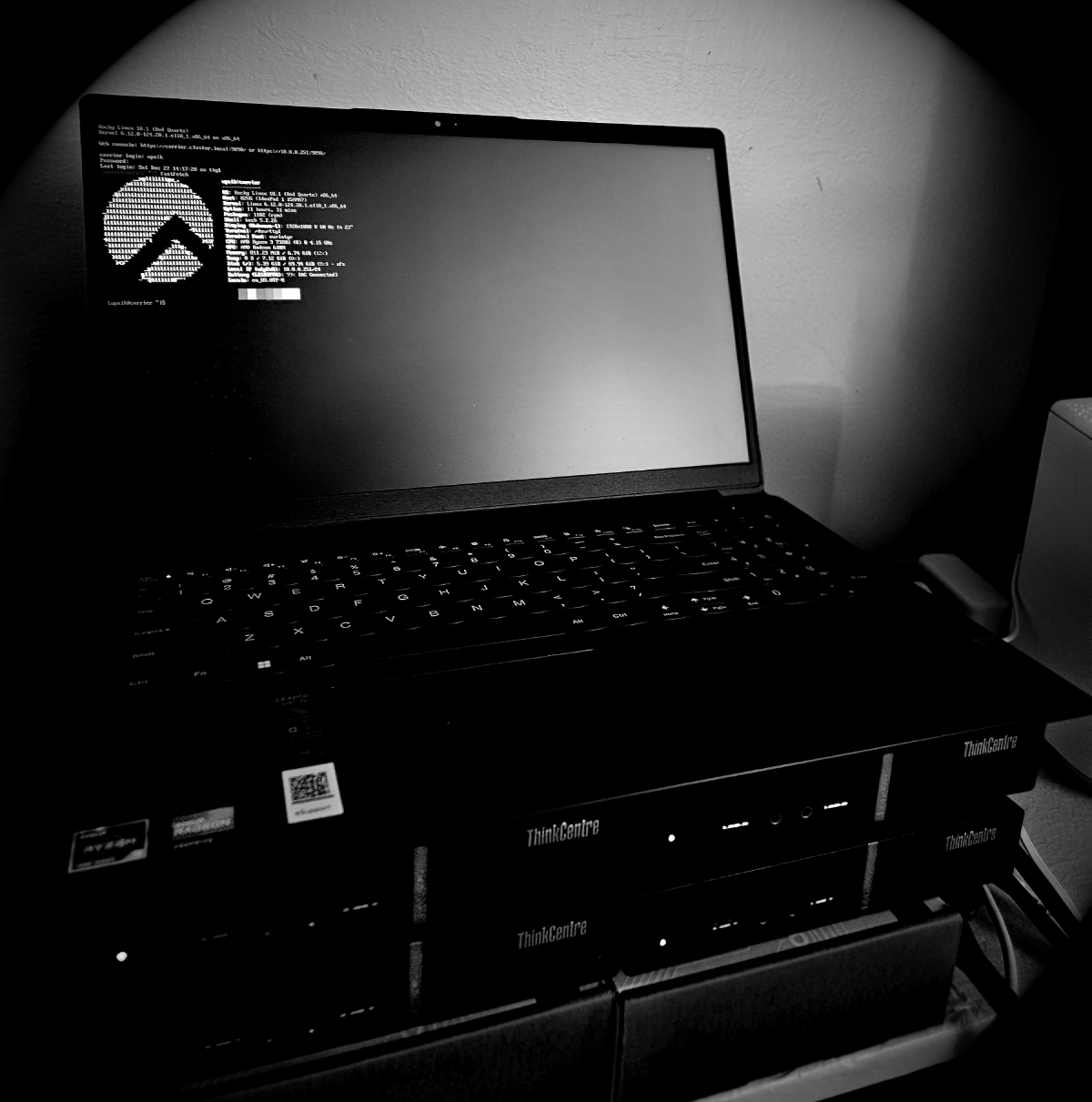

The cluster has a scheduler, accounting, and a full software stack in /shared/sw. None of it is reachable without exporting paths by hand, and there is still no way to run a Docker container on it.
Welcome back to HPC From Scratch. In Episode 6, we set up Slurm accounting, QOS, and fair-share scheduling so the cluster knows exactly who used what and when. The software stack in /shared/sw is already built from source: Python, OpenMPI, GCC, and more. The problem is access. Loading Python right now means manually prepending /shared/sw/python/3.12.12/bin to PATH, and that export vanishes the moment you log out. This episode covers two tools that solve two different but related problems: Lmod, for managing software versions cleanly, and Apptainer, for running containers on a cluster where nobody has root.
1. Why Lmod Matters #
When you run a shared cluster, even a small home lab one, software version conflicts show up fast. One user needs Python 3.10 for a legacy workflow. Another needs 3.12. Without a module system, both are manually exporting paths, stepping on each other’s environments, and neither can tell which python3 is actually active at any given moment.
Lmod is a module system. It gives every user a clean interface to load and unload software packages by name and version. One command puts the right binaries and libraries into the environment. Another removes them precisely, without leaving residue. The software itself still lives in /shared/sw as before; Lmod is the management layer on top.
Module systems have been standard on HPC clusters for decades. The original Environment Modules was written in Tcl. Lmod, built by the Texas Advanced Computing Center (TACC), replaced it on most modern clusters for two reasons: it handles dependencies between software packages automatically, and it can search across the full software tree with module spider rather than requiring you to know exact module names in advance.
2. How Lmod Works #
Lmod reads a directory tree called the MODULEPATH. Each subdirectory in that tree is a software family: python, openmpi, gcc. Each file inside is a version, written as a Lua script. When you run module load python/3.12.12, Lmod reads the corresponding .lua file and applies whatever instructions are inside: prepend to PATH, set LD_LIBRARY_PATH, load a dependency.
The layout for this cluster looks like this:
MODULEPATH includes /shared/sw/modulefiles

/shared/sw/modulefiles/
├── python/
│   └── 3.12.12.lua     ⬅ module load python/3.12.12
├── gcc/
│   └── 12.5.0.lua      ⬅ module load gcc/12.5.0
└── openmpi/
    └── 5.0.9.lua       ⬅ module load openmpi/5.0.9
Note on version numbers: The versions above (3.12.12, 12.5.0, 5.0.9) match what is installed in
/shared/swon this cluster. Check yours withls /shared/sw/python/,ls /shared/sw/gcc/, andls /shared/sw/openmpi/before writing modulefiles.
The Lua files themselves are short. They declare a base path and tell Lmod which environment variables to modify. They can also declare dependencies: depends_on("gcc/12.5.0") inside an OpenMPI modulefile tells Lmod to load that GCC version automatically when OpenMPI is loaded, and to unload it when OpenMPI is unloaded.
3. Prerequisites #
Before running the commands in this episode:
- Episodes 1 through 6 are complete
/shared/swis populated with software builds- The Ansible inventory at
/opt/ansible/hosts.iniis reachable (ansible all_nodes -m pingreturns success)
Everything below uses Ansible ad-hoc commands (ansible all_nodes -m ... -a "...") rather than playbook files, so each step is visible on its own line. The GitHub repository packages the same steps into idempotent playbooks if you want the reusable, re-runnable version.
4. Installing Lmod #
Rocky Linux 10 ships Lmod 8.7.65 directly in its repositories. The current upstream release is 9.2.6, a full major version ahead. That gap is real, but it is not by itself a reason to build from source. Source builds in this series happen when the distro package is missing something we actually need, the way Episode 5’s Slurm RPM lacked PMIx and cgroup v2 support. There is no equivalent gap here: nothing in this episode or the next needs a 9.x-only Lmod feature. So we install from the repository, across all five nodes in one command:
[wpaik@arbiter ~]$ ansible all_nodes -b -K -m dnf -a "name=Lmod state=present"-b runs the task as root, -K prompts for the sudo password once and reuses it across nodes. Confirm what landed:
[wpaik@arbiter ~]$ ansible all_nodes -m shell -a "rpm -q Lmod"
interceptor-01 | CHANGED | rc=0 >>
Lmod-8.7.65-2.el10_2.x86_64
What the RPM sets up on its own #
Worth knowing before adding anything custom: the Lmod RPM is not a bare binary drop. rpm -ql Lmod shows it installs its own profile.d scripts and default MODULEPATH locations:
/etc/profile.d/00-modulepath.sh   ⬅ sets a default MODULEPATH
/etc/profile.d/modules.sh         ⬅ sources Lmod's init, defines the `module` command
/etc/modulefiles                  ⬅ a default search path (unused here)
/usr/share/modulefiles            ⬅ another default search path (unused here)
/usr/share/lmod/8.7.65/...        ⬅ the actual Lmod install
/usr/share/lmod/lmod              ⬅ symlink to 8.7.65/, same versioning convention as a source build
The package creates its own default MODULEPATH entries (/etc/modulefiles and /usr/share/modulefiles), but we are not using either of those. Our software lives in /shared/sw/modulefiles, so that needs to be added separately.
Adding the shared MODULEPATH #
profile.d scripts run in alphabetical order. 00-modulepath.sh runs first, modules.sh runs after it and is what actually defines the module command. Anything that calls module use has to run after both, or the module command will not exist yet to call. A file named to sort later does the job, with a guard that checks Lmod actually loaded before calling module use:
# /etc/profile.d/z00-shared-modulepath.sh
# only when Lmod is loaded
if [ -n "$LMOD_CMD" ]; then
    module use /shared/sw/modulefiles
fi
LMOD_CMD is set by Lmod’s own init once it has run. Checking for it rather than assuming script order worked out correctly means this file fails safely (does nothing) instead of throwing a “command not found” error in any shell where Lmod’s init did not run for some reason.
Create that file once, locally, then push it out to every node:
[wpaik@arbiter ~]$ ansible all_nodes -b -m copy -a "src=/etc/profile.d/z00-shared-modulepath.sh dest=/etc/profile.d/z00-shared-modulepath.sh mode=0644"src here is read from arbiter, the machine running this ansible command, and pushed out to the same path on every node in all_nodes, including back onto arbiter itself (a harmless no-op there since the file is already in place).
Verify on a compute node:
[wpaik@interceptor-01 ~]$ module --version
Modules based on Lua: Version 8.7.65 2024-03-04 14:23:01

[wpaik@interceptor-01 ~]$ echo $MODULEPATH
/shared/sw/modulefiles:/etc/modulefiles:/usr/share/modulefiles
Pinning the version #
Pin Lmod against an accidental upgrade through a routine dnf update, using excludepkgs in /etc/dnf/dnf.conf, the option name Red Hat’s own documentation uses for both RHEL 9 and RHEL 10:
[wpaik@arbiter ~]$ ansible all_nodes -b -m shell -a "grep -q '^excludepkgs=' /etc/dnf/dnf.conf || sed -i '/^\[main\]/a excludepkgs=Lmod' /etc/dnf/dnf.conf"The grep -q ... || sed -i ... pattern only adds the line if it is not already there, so re-running this command does nothing the second time. Keep this in mind once Apptainer is pinned later in this episode: a command that blindly overwrites excludepkgs= would erase whichever package got pinned first, since dnf.conf only keeps the last value written to a given key. The Apptainer section below appends to the existing line instead of overwriting it.
[wpaik@arbiter ~]$ ansible all_nodes -m shell -a "grep excludepkgs /etc/dnf/dnf.conf"
interceptor-01 | CHANGED | rc=0 >>
excludepkgs=Lmod
5. Renaming the Modulefiles Directory #
The directory at /shared/sw/modules needs to become /shared/sw/modulefiles to match the path used above. This is a single-node change on arbiter, the NFS server, so it does not need Ansible at all:
[wpaik@arbiter ~]$ ls /shared/sw/
cmake  cuda  gcc  miniconda3  modules  openmpi  parallel  python  R  rclone

[wpaik@arbiter ~]$ mv /shared/sw/modules /shared/sw/modulefiles
If you already renamed it by hand at some earlier point, this command will simply fail with “No such file or directory” since modules will not exist. Check with ls /shared/sw/ first if you are not sure.
6. Writing a Modulefile: Python #
Modulefiles live at /shared/sw/modulefiles/<family>/<version>.lua. Confirm the installed Python version first:
[wpaik@arbiter ~]$ ls /shared/sw/python/
3.12.12/
Create the directory and write the modulefile:
[wpaik@arbiter ~]$ mkdir -p /shared/sw/modulefiles/python
[wpaik@arbiter ~]$ vi /shared/sw/modulefiles/python/3.12.12.luahelp([[
Python 3.12.12 installed in /shared/sw/python/3.12.12
]])
whatis("Name: Python")
whatis("Version: 3.12.12")
whatis("Description: Python programming language")
local base = "/shared/sw/python/3.12.12"
prepend_path("PATH", pathJoin(base, "bin"))
prepend_path("LD_LIBRARY_PATH", pathJoin(base, "lib"))
prepend_path("MANPATH", pathJoin(base, "share/man"))pathJoin is a Lmod built-in that concatenates paths cleanly.
Test it from a compute node:
[wpaik@interceptor-01 ~]$ module load python/3.12.12
[wpaik@interceptor-01 ~]$ python3 --version
Python 3.12.12
[wpaik@interceptor-01 ~]$ which python3
/shared/sw/python/3.12.12/bin/python3
7. Writing a Modulefile: OpenMPI #
OpenMPI was compiled against a specific GCC version. Its modulefile should declare that dependency so Lmod loads the right GCC automatically. The GCC modulefile follows the same pattern as Python: swap the base path and update the whatis fields.
Confirm installed versions:
[wpaik@arbiter ~]$ ls /shared/sw/gcc/
12.5.0/
[wpaik@arbiter ~]$ ls /shared/sw/openmpi/
5.0.9/
Write the OpenMPI modulefile:
[wpaik@arbiter ~]$ mkdir -p /shared/sw/modulefiles/openmpi
[wpaik@arbiter ~]$ vi /shared/sw/modulefiles/openmpi/5.0.9.luawhatis("Name: OpenMPI")
whatis("Version: 5.0.9")
whatis("URL: https://www.open-mpi.org/")
local version = "5.0.9"
local base = pathJoin("/shared/sw/openmpi",version)
depends_on("gcc/12.5.0")
prepend_path("PATH", pathJoin(base,"bin"))
prepend_path("CPATH", pathJoin(base,"include"))
prepend_path("LD_LIBRARY_PATH", pathJoin(base,"lib"))A couple of differences from the Python modulefile worth calling out. depends_on("gcc/12.5.0") is the key one: when you load OpenMPI, Lmod checks whether gcc/12.5.0 is already loaded, and loads it if not. When you unload OpenMPI, Lmod unloads GCC too, unless something else also depends on it. The other addition is CPATH, which tells the compiler where to find header files like mpi.h at compile time. PATH and LD_LIBRARY_PATH alone get you a working mpirun, but anyone compiling their own MPI code against this module needs CPATH set as well.
Test it:
[wpaik@interceptor-01 ~]$ module load openmpi/5.0.9
[wpaik@interceptor-01 ~]$ module list

Currently Loaded Modules:
  1) gcc/12.5.0  2) openmpi/5.0.9

[wpaik@interceptor-01 ~]$ mpirun --version
mpirun (Open MPI) 5.0.9
GCC loaded automatically even though only OpenMPI was requested.
8. Verifying the Setup #
Run through these on a compute node:
# See everything available in MODULEPATH
[wpaik@interceptor-01 ~]$ module avail

# Search all modules, even ones not currently in MODULEPATH
[wpaik@interceptor-01 ~]$ module spider python

# Load and check
[wpaik@interceptor-01 ~]$ module load python/3.12.12
[wpaik@interceptor-01 ~]$ module list

# Unload
[wpaik@interceptor-01 ~]$ module unload python/3.12.12

# Clear everything
[wpaik@interceptor-01 ~]$ module purge
For Slurm batch jobs, add module load calls to the job script. The RPM’s own profile.d scripts plus our z00-shared-modulepath.sh are sourced automatically for new login shells, so module is available inside scripts:
#!/bin/bash
#SBATCH --job-name=mpi-test
#SBATCH --nodes=2
#SBATCH --ntasks-per-node=4

module purge
module load openmpi/5.0.9

mpirun -np 8 ./my_mpi_program
module purge at the start of a job script clears any modules the submitting user had loaded interactively and starts from a clean state.
9. Troubleshooting #
module: command not found
Open a new terminal session; profile.d scripts only apply to new logins. If it is still missing, confirm the RPM is installed: rpm -q Lmod.
module avail does not show /shared/sw/modulefiles
Check echo $MODULEPATH. If /shared/sw/modulefiles is missing, confirm /etc/profile.d/z00-shared-modulepath.sh exists on that node and that it sorts after modules.sh alphabetically.
module load openmpi/5.0.9 fails with “not found”
Check the modulefile path: ls /shared/sw/modulefiles/openmpi/. Confirm the NFS share is mounted: df -h | grep shared.
depends_on loads the wrong GCC version
depends_on("gcc") without a version loads whichever GCC is marked default. Use depends_on("gcc/12.5.0") to pin to the exact version the software was compiled against.
Lmod got upgraded unexpectedly
Check the pin: grep excludepkgs /etc/dnf/dnf.conf. If Lmod is missing from the list, re-run the sed command from Section 4’s pinning step.
10. Containers on a Shared Cluster: Why Not Just Docker #
Lmod solves software versioning. The next problem is software that needs an entire isolated environment: a specific OS userspace, conflicting library versions, or a tool that only ships as a Docker image. Docker is the obvious answer everywhere else. On a shared HPC cluster, it does not work.
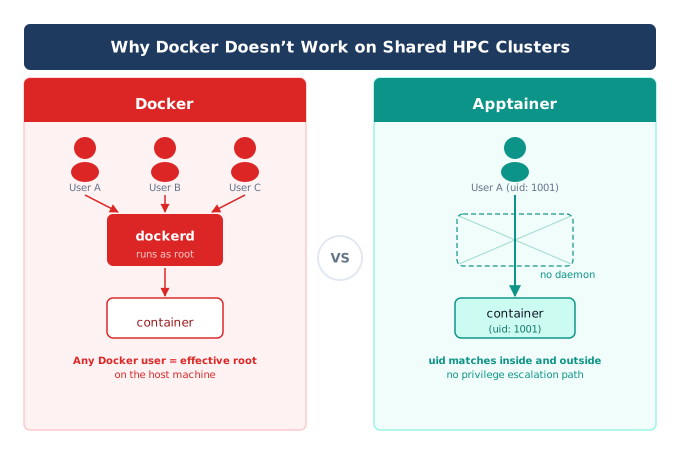
Docker runs through a daemon (dockerd) that has root privileges on the machine. To start a container, a user’s request goes through that daemon. The daemon decides what happens, and since it runs as root, anything that can talk to it can effectively act as root on the host. On a workstation with one user, that is an acceptable trust model. On a cluster shared by multiple users, it is not. Giving every user access to the Docker daemon is equivalent to giving every user root.
Apptainer (formerly Singularity) was built specifically to solve this. The core design rule: whoever you are outside the container is who you are inside the container. No daemon, no elevated privilege, no privilege escalation path through the container runtime. This is why HPC centers standardized on it instead of Docker.
A few other practical differences matter for cluster use:
- Single file vs. layered image. Apptainer packages a container as one file (
.sif, Singularity Image Format). Docker images are a stack of layers managed by a daemon and a local image store. A.siffile can be copied to another machine withscpand run immediately. - Integration over isolation. Docker isolates containers from the host by default: separate network namespace, separate filesystem. Apptainer does the opposite by default: it shares the host’s network, mounts your home directory, and gives you direct access to GPUs and high-speed interconnects.
- Docker compatibility. Apptainer can pull and run Docker images directly. You are not giving up the Docker Hub ecosystem, just the daemon.
11. Installing Apptainer #
Rocky Linux 10’s repository ships Apptainer 1.5.0, a few patch releases behind upstream’s 1.5.3. That gap is trivial, so this is a straightforward dnf install across all five nodes:
[wpaik@arbiter ~]$ ansible all_nodes -b -K -m dnf -a "name=apptainer state=present"[wpaik@interceptor-01 ~]$ apptainer --version
apptainer version 1.5.0Binaries land at /usr/bin/apptainer, already on PATH for every user. No module or path setup needed.
Pin it the same way Lmod was pinned in Section 4, but append to the existing line rather than overwriting it. Writing a fresh excludepkgs=apptainer here would erase the Lmod pin already in place, since dnf.conf’s INI format keeps only the last occurrence of a key in a section:
[wpaik@arbiter ~]$ ansible all_nodes -b -m shell -a "grep -q 'excludepkgs=.*apptainer' /etc/dnf/dnf.conf || sed -i '/^excludepkgs=/ s/$/,apptainer/' /etc/dnf/dnf.conf"The grep -q 'excludepkgs=.*apptainer' || sed -i ... guard means running this twice does not add a duplicate entry. Confirm both packages ended up on the same line:
[wpaik@arbiter ~]$ ansible all_nodes -m shell -a "grep excludepkgs /etc/dnf/dnf.conf"
interceptor-01 | CHANGED | rc=0 >>
excludepkgs=Lmod,apptainer
12. Building a Container Image Locally #
Container images can usually be built on a personal workstation. The resulting .sif file is then copied to the cluster, where it runs without any restriction.
Here is a minimal example. hello.def is an Apptainer definition file:
Bootstrap: docker
From: ubuntu:24.04

%files
    hello.py /opt/hello.py

%post
    apt-get update && apt-get install -y python3

%runscript
    python3 /opt/hello.py "$@"

%labels
    Author Will Paik
    Version 1.0
And hello.py:
import platform
import sys

print(f"Running inside Apptainer container")
print(f"Python: {sys.version.split()[0]}")
print(f"Hostname: {platform.node()}")
Bootstrap: docker plus From: ubuntu:24.04 tells Apptainer to pull the base layer from Docker Hub. %files copies a local file into the image at build time. %post runs commands inside the image to install software. %runscript defines what happens when the finished image is run with apptainer run.
Build it on your local workstation, where you have real root:
[wpaik@workstation ~]$ apptainer build hello.sif hello.def
INFO:    Starting build...
...
INFO:    Build complete: hello.sif
Copy the finished image to the cluster:
[wpaik@workstation ~]$ scp hello.sif wpaik@carrier:/scratch/wpaik/Run it on the cluster. We are running a finished .sif:
[wpaik@interceptor-01 ~]$ apptainer run /scratch/wpaik/hello.sif
Running inside Apptainer container
Python: 3.12.12
Hostname: interceptor-01
13. Pulling From Docker Hub #
For software that already has a maintained Docker image, there is no need to write a definition file at all. apptainer pull converts a Docker image directly into a .sif:
[wpaik@interceptor-01 ~]$ apptainer pull docker://pytorch/pytorch:latest
INFO:    Converting OCI blobs to SIF format
...
INFO:    Creating SIF file...
This produces pytorch_latest.sif in the current directory. Apptainer is just converting OCI layers into SIF format and create an image file.
14. shell vs exec vs run #
Three commands run a container, and they differ in what happens once you are inside.
apptainer shell drops you into an interactive shell inside the container:
[wpaik@interceptor-01 ~]$ apptainer shell pytorch_latest.sif
Apptainer> python3 --version
Python 3.11.9
Apptainer> exit
apptainer exec runs one specific command inside the container and returns you to the host shell immediately after:
[wpaik@interceptor-01 ~]$ apptainer exec pytorch_latest.sif python3 --version
Python 3.11.9
apptainer run executes whatever the container’s %runscript defines, or the image’s inherited Docker ENTRYPOINT/CMD if pulled from Docker Hub and no %runscript was set:
[wpaik@interceptor-01 ~]$ apptainer run hello.sif
Running inside Apptainer container
Python: 3.12.12
Hostname: interceptor-01
For one-off testing, exec is usually what you want. For a defined default behavior, run is the right tool. shell is for interactive exploration.
15. Useful Runtime Options #
A handful of flags cover most real usage:
--nv exposes the host’s NVIDIA driver and CUDA libraries inside the container. Required for any GPU workload:
[wpaik@corsair-01 ~]$ apptainer exec --nv pytorch_latest.sif python3 -c "import torch; print(torch.cuda.is_available())"
True
-B / --bind mounts a host path into the container at a specified location:
[wpaik@interceptor-01 ~]$ apptainer exec -B /scratch:/scratch pytorch_latest.sif ls /scratchWithout this, the container only sees its own filesystem plus a few defaults (your home directory and current working directory are bound automatically).
--env sets an environment variable inside the container without modifying the image:
[wpaik@interceptor-01 ~]$ apptainer exec --env OMP_NUM_THREADS=4 pytorch_latest.sif python3 my_script.pyThese three options cover the bulk of day-to-day use. apptainer help exec lists the rest.
16. Apptainer: Where It Helps and Where It Doesn’t #
Good fit:
- Software that only ships as a Docker image (most modern ML tooling: PyTorch, TensorFlow, common bioinformatics tools)
- Conflicting dependency stacks, like needing two different CUDA versions for two different jobs on the same cluster
- Reproducibility: a
.siffile is a single artifact you can archive and re-run years later without rebuilding an environment - Running inside Slurm batch jobs, since Apptainer integrates with the host’s filesystem and network by default
Limitations to know about:
- Supplementary group membership is not fully visible inside the container, since user namespaces only map a single group.
- Encryption support (encrypted SIF images) is not yet available in this build mode of Apptainer.
- There is a small FUSE-based overhead for some overlay operations. Apptainer’s own documentation describes this as not significant for typical HPC workloads, and that has held up in casual testing on this cluster.
None of these limitations are specific to a home lab or to installing via dnf. They apply at real HPC centers too.
17. Troubleshooting #
apptainer: command not found
Confirm the package is installed: rpm -q apptainer. Binaries should be at /usr/bin/apptainer, already on PATH.
--nv flag does not expose the GPU
Confirm the NVIDIA driver is installed and working on the host first: nvidia-smi outside the container. If that works but the container still cannot see the GPU, check apptainer exec --nv pytorch_latest.sif nvidia-smi for a more specific error.
apptainer pull hangs or fails on a slow connection
Docker Hub pulls can be large for ML framework images. Confirm outbound connectivity first with a small image: apptainer pull docker://alpine.
Apptainer got upgraded unexpectedly
Check the pin: grep excludepkgs /etc/dnf/dnf.conf. If apptainer is missing from the list, re-run the sed command from Section 11’s pinning step.
18. What is Next #
The cluster now has both pieces needed to manage software cleanly: Lmod for versioned software through module load, and Apptainer for anything that needs an isolated environment or only ships as a container. Between the two, most “this works on my machine but not on the cluster” problems go away.
Episode 8 moves to MPI. We will run a real multi-node job across interceptor-01 and interceptor-02 using the OpenMPI module registered in this episode, then benchmark the cluster with OSU Micro-Benchmarks to see what a 1GbE interconnect actually looks like under real MPI traffic. All files from this episode, including the Ansible playbooks and the example definition file, are in the GitHub repository.
Happy Computing!